
The ACF Migration moves a site from Advanced Custom Fields to Modern Fields: its field groups, their values, its options pages, post types and taxonomies. A screen takes you through five steps (Source, Plan, Values, Import and Report), and the wp modern-fields acf-import command runs the same migration from the terminal.
The ACF Migration is only available in the pro version of Modern Fields, since Modern Fields Pro 1.4.0. It is in beta: back up your database before migrating, and try it on a staging copy of the site first.
Requirements
- ACF or ACF PRO 6.1 or later, or Secure Custom Fields, which shares ACF’s code and stores field groups and values the same way. On an older ACF, the migration asks you to update it first: its field groups and values stay as they are.
- ACF without PRO reads a repeater stored in the database without its sub-fields. The plan refuses such a repeater and asks you to activate ACF PRO or Secure Custom Fields for the migration: both read the same field groups.
- Modern Fields Pro 1.4.0, which needs Modern Fields 1.6.0 or later.
The ACF Migration item, marked Beta, shows in the Modern Fields menu after Import / Export, while ACF is active, for the users who may manage Modern Fields. Once ACF is switched off, it stays as long as a migration is kept: the cleanup is in its report.
What is imported
- Field groups: 37 ACF field types are mapped, from repeater, group, clone and gallery to relationship, link, Google Map, WYSIWYG and the Color Palette add-on, with their layout (widths, tabs, accordions, messages), their conditional logic, their location rules and their roles.
- Options pages, post types and taxonomies: taken over with their settings, under the same keys, so content and terms stay attached. Modern Fields defines them from then on, and ACF’s definitions are switched off, not deleted.
- Bidirectional relationships: one side stays a bidirectional field, and the other becomes a Reverse Relation field.
get_field()keeps working on both. - Values: those of the fields imported, from this site’s database (see step 3).
ACF tabs become the Tabs block of WordPress 7.1. On an older WordPress, each tab becomes a heading, and the fields of every tab follow one another: update WordPress before importing to keep the tabs.
What is not imported
- Flexible Content, by design: it mostly serves as a page builder, which is the job of blocks and patterns in the block editor. Its layouts and values stay in ACF’s rows, and we recommend rebuilding the pages using it with blocks and patterns.
- A repeater inside a repeater: Modern Fields repeaters cannot be nested.
- ACF blocks, and the field groups placed on them: they come in a later version.
The plan says, for each group, what is left out and why.
Migrate in five steps
Go to Modern Fields > ACF Migration. Once the groups are analyzed, the migration keeps your choices and the step you stand on: you can leave the screen and pick the migration up where it stands.
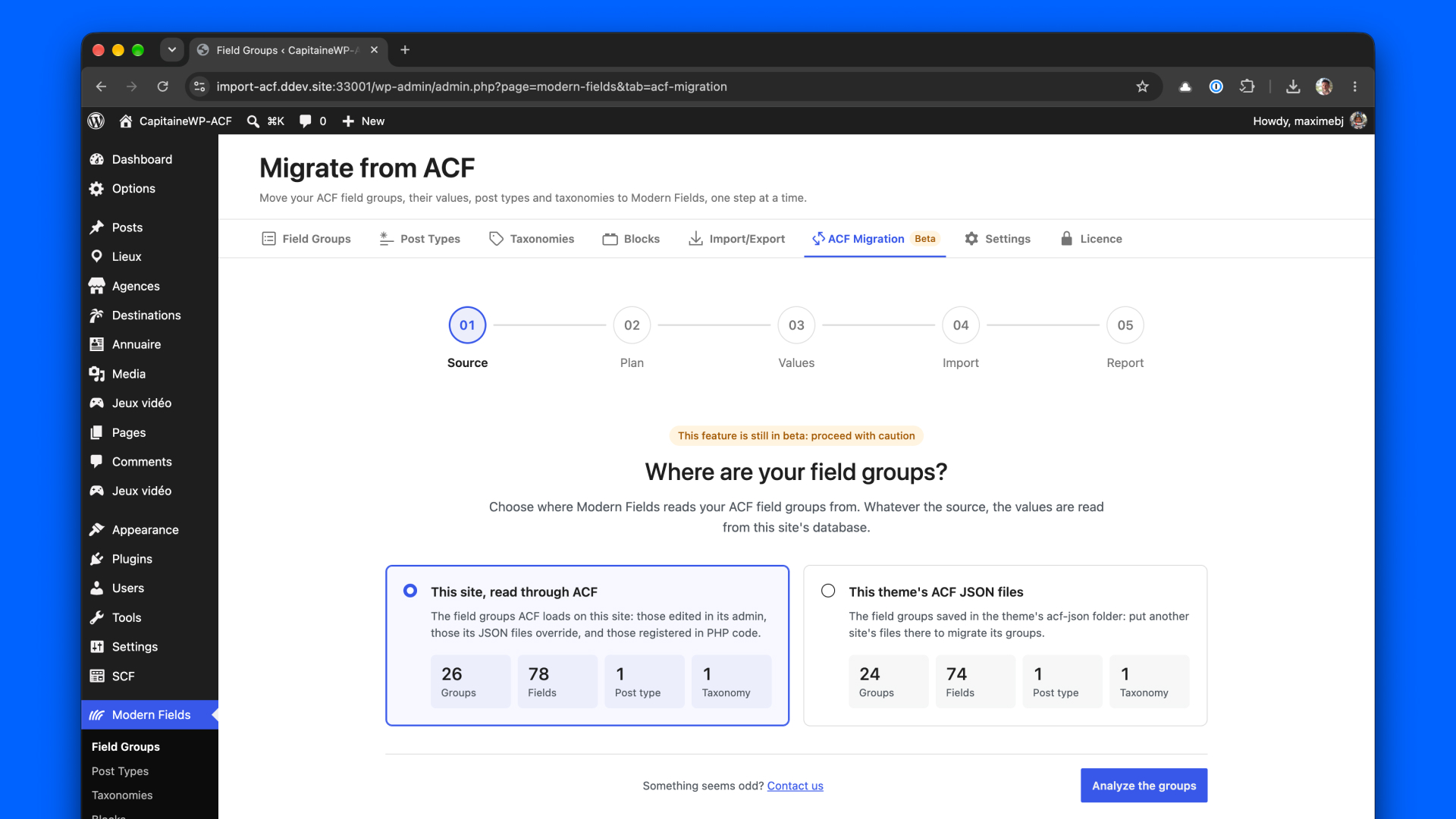
1. Source
Choose where Modern Fields reads your ACF field groups from:
- This site, read through ACF: the field groups ACF loads, those edited in its admin, those its JSON files override, and those registered in PHP code.
- This theme’s ACF JSON files: the field groups saved in the theme’s
acf-jsonfolder. Put another site’s files there to migrate its groups.
Whatever the source, the values are read from this site’s database. Click Analyze the groups.
2. Plan
Nothing is written yet. The plan shows what each ACF field group becomes in Modern Fields: Ready, Partly supported or Not supported, with its locations, its fields, and what changes or is left out on the way. The post types and taxonomies to take over are listed too.
Check the groups to import, then continue.
3. Values
Most fields store their value the way Modern Fields reads it: ACF and Modern Fields read the same value, and nothing is copied. For the fields that store it in another shape, a repeater for example, the import writes a converted copy, and you choose where it goes:
| What happens | |
|---|---|
| Keep ACF’s values | The converted copy goes under a prefixed name (mf_ by default, changed in Advanced options), next to ACF’s value. ACF keeps working as before, and your templates read these fields under their new name. Both values are stored until you clean ACF’s up. |
| Replace them | The converted value takes the field’s own name, in place of ACF’s: templates keep calling the same names, and get the value in its new shape. ACF can no longer read these fields, so its field groups holding them are switched off: switch to Modern Fields right after the import. What ACF had is saved to a rollback log first. |
The choice applies to every field, and Field by field sets it apart for one field. Replacing values asks you to confirm that you have a backup of the database.
4. Import
Modern Fields writes the post types, taxonomies and field groups chosen, then converts the values that need it, a batch at a time. You can leave the page: the import stops after the current batch, and goes on when you come back. If it stops, Go on resumes after the last record done.
5. Report
The report shows what the import wrote, and what reading a sample of the values back found. Then it walks you through the switch, in this order.
Prepare the templates. A theme scan lists, with file and line, what the active theme and the must-use plugins need ACF for: ACF functions, classes extending ACF’s, Extended ACF, ACF Builder or ACF Composer, Timber templates, and field keys passed to get_field(). Each ACF function comes with what to do before the switch: keep it (Modern Fields has the same function), change it (display the field with the Field Value block instead), or remove it.
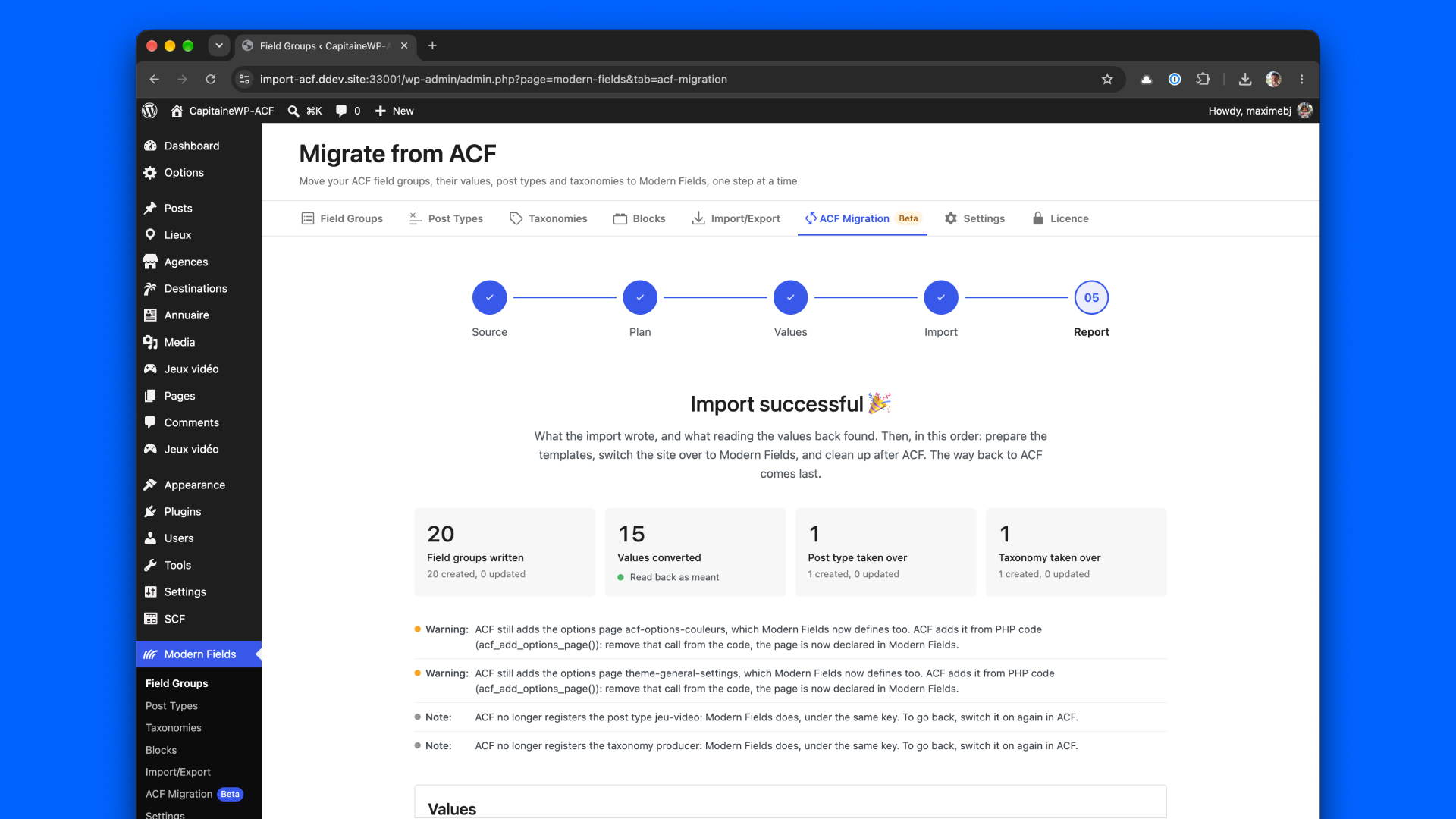
Switch to Modern Fields. One action deactivates ACF and switches on Modern Fields’ get_field() and the_field(), which answer your templates from the next page on, then checks that the home page answers. Most other ACF functions (have_rows(), get_sub_field(), update_field()…) then do nothing rather than stop the page, and the report lists where they were called since the switch. Those that would stop the page are in the theme scan: change or remove them first.
Clean up after ACF. Once ACF is off, the cleanup deletes what ACF leaves behind for the field groups imported, each on your choice and counted first: ACF’s companion rows (_name, holding the field key), ACF’s values Modern Fields holds the same value of (the rollback logs go with them), or the rollback logs alone. Once it is done, going back to ACF is no longer possible.
Going back to ACF. Until the cleanup, ACF can take over again: switch Modern Fields’ get_field() and the_field() off, reactivate ACF from the Plugins screen, and put back the values the import wrote over: the ACF field groups the import switched off are switched on again. The Modern Fields field groups stay as they are.
Your templates after the migration
Your templates keep calling get_field() and the_field(), now answered by Modern Fields, so the site keeps working while you move its display to blocks at your own pace. A few things change:
- Raw values: Modern Fields returns values as they are stored, not in ACF’s return format. An image field returns the ID of its image, a date returns as
2026-10-12T00:00:00. - Arguments: Modern Fields takes
get_field($name, $context), where ACF takes$post_idand$format_value.'option'and'options'both work. See Functions get_field() and the_field(). - Fields kept apart: a field whose ACF value you kept is read under its prefixed name,
mf_teamforteam. - Repeaters:
get_field()returns the rows as an array, see the Repeater field.
Only the home page is checked after the switch: open the other templates of the site too.
Migrate with WP-CLI
wp modern-fields acf-import runs the same migration as the screen, with the same rules: an import started on one goes on from the other, and either one's report reads the other's. Running it again is safe: a group is updated only if nobody edited it since, a value already moved is not written again, and an interrupted run goes on where it stopped. The switch to Modern Fields is made from the report screen.
| Effect | |
|---|---|
--dry-run | Plan without writing anything. Refused with --resume, --values-only, --rollback and --discard, which write. |
--source=<source> | Where to read the ACF definitions: database (default) or json. Values always come from this site's database. |
--file=<path> | An ACF export, an acf-json file, or a folder of them. Overrides --source. |
--group=<key> | Only report and import this ACF field group, post type or taxonomy, by its key. |
--storage=<storage> | For the fields whose stored shape changes: keep ACF's value and write to a prefixed name (default), or overwrite it. |
--overwrite=<fields> / --keep=<fields> | Overwrite, or keep, these fields whatever --storage says: names or ACF keys, comma-separated. |
--prefix=<prefix> | Prefix of the fields kept apart from ACF's, mf_ by default. |
--structures-only | Take the post types and taxonomies over and write the field groups, then stop: --resume moves the values. |
--resume / --values-only | Go on with the import under way, started here or on the screen. |
--restart | Discard an import under way, then plan this one. |
--discard | Forget the import under way, or done: what it wrote stays written, and so do the rollback logs. |
--force | Also overwrite the groups, post types and taxonomies edited since the import wrote them, and the kept values edited since they were moved. |
--batch-size=<number> | Records handled per batch, 100 by default. |
--scan-theme | List what the active theme and the must-use plugins need ACF for, and where. |
--cleanup=<actions> | Once the import is done and ACF is off, delete what ACF leaves behind: companions, acf-values, rollback-logs, comma-separated. With --dry-run, counts only. Going back to ACF is impossible afterwards. |
--rollback | Put back the values the import wrote over, and switch on again the ACF field groups it switched off. |
--[no-]count | Count the stored values, on by default. |
--verbose | Also list the informational notes. |
--format=<format> | table (default) or json. Anything but a dry run then needs --yes. |
--yes | Answer yes to the confirmation. |
Run wp help modern-fields acf-import for the full description of each option.