
The Map field stores a location: search for an address, click the map or drag the pin, and Modern Fields saves the coordinates along with the address, its city, postcode and country.
It works out of the box with OpenStreetMap, with no account and no API key. Add a Google Maps API key and the same field draws with Google Maps instead.
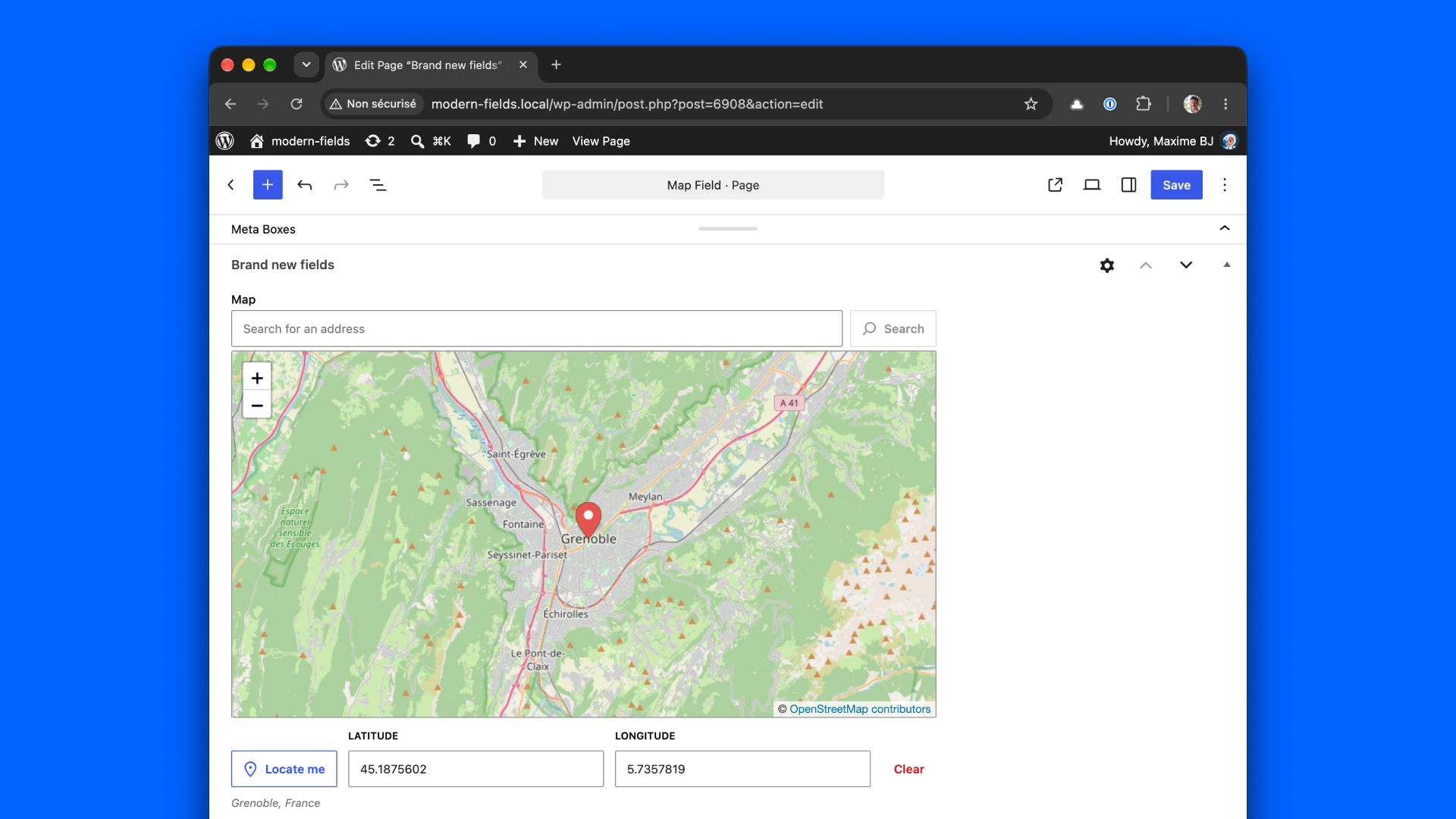
The field lives in the admin: it stores a location, it does not display a map to your visitors. Your template decides what to show — an address, a link to a map, or a map you draw yourself (see Display the location below).
Choose a map provider
One provider draws every map of the site. By default, it is chosen from your credentials: no Google key means OpenStreetMap, a Google key means Google Maps. The field settings tell you which one is in use, under Map provider.
| You want | What to do |
|---|---|
| OpenStreetMap | Nothing. Do not set a Google key. |
| OpenStreetMap, while a Google key is set on the site | Add define('MODERN_FIELDS_MAPS_PROVIDER', 'osm'); to the wp-config file |
| Google Maps | Set a Google Maps API key (see below) and enable three Google APIs |
| Google Maps with a custom style | Also set a Map ID |
MODERN_FIELDS_MAPS_PROVIDER accepts 'google' or 'osm' and always wins over the key. The modern-fields/maps/provider filter runs last and can override both.
Switching provider on a site that already has values is safe: coordinates and addresses stay valid. A staging site without the Google key falls back to OpenStreetMap while production uses Google: define MODERN_FIELDS_MAPS_PROVIDER on both to keep them aligned.
| Google Maps | OpenStreetMap | |
|---|---|---|
| Address search | Suggestions as you type | Runs when you press Enter or click Search, up to 5 matches |
| Address after a click | Immediate | Arrives a moment after the pin, the coordinates are saved first |
| Place ID | Google's place ID | Empty |
| Settings | All | No map type, theme, map ID, Street View, fullscreen or clickable points of interest |
| Cost | Billed by Google beyond the free allowance | Free |
Use Google Maps
Set the API key
There is no settings screen for the key, on purpose: a key stored in the database travels into every export, staging copy and backup. Define it in the wp-config file:
Or return it from the modern-fields/maps/api_key filter, to read it from the environment. The filter runs after the constant, so it wins.
Enable the Google APIs
In the Google Cloud console, on the project of the key, enable these three APIs. Billing must be enabled on the project, even within the free allowance.
| API | Powers | Without it |
|---|---|---|
| Maps JavaScript API | The map itself | No map: the field falls back to latitude and longitude inputs |
| Places API (New) | The address search | The search box says it is unavailable, the map still works |
| Geocoding API | The address after a click or a drag | The pin and coordinates are saved, the address stays empty |
A browser key cannot be kept secret: it is sent with Google's script. Protect it with restrictions instead: in APIs & Services › Credentials, restrict it to your website (https://yourdomain.com/*) and to these three APIs.
Style the map with a Map ID
The Theme setting switches between light and dark without any setup. For a fully custom look, create a Map ID in Google Maps Platform › Map management (type JavaScript, rendering Vector), attach a map style to it, then paste it in the field's Map ID setting, or site-wide:
Configuration
Go to Modern Fields > Fields groups and add the Map field block. Its settings are in the inspector. Settings marked Google only show when Google Maps draws the map, and keep their value while hidden.
| Setting | Effect |
|---|---|
| Default center | Where the map opens while the field is empty (latitude and longitude). Paris by default. |
| Default zoom | The zoom level of the empty map. 10 by default. |
| Height | The height of the map in the form, in px, vh or rem. 400px by default. |
| Map type (Google) | Road map, Satellite, Terrain or Hybrid. |
| Zooming | Ctrl + scroll (default, so a long form doesn't zoom the map as you scroll past it), Scroll, or Locked. |
| Theme (Google) | System, Light or Dark. |
| Marker color | The color of the pin. |
| Map ID (Google) | A Map ID carrying a custom style. Overrides the site-wide one. |
| Search for an address | Adds a search box above the map. Turn it off to never call the search service. |
| Limit the search to these countries | Only suggest addresses in the countries you pick. |
| Controls | Show the zoom buttons, the map type switcher (Google), the Street View pegman (Google), the fullscreen button (Google), and make points of interest clickable (Google). |
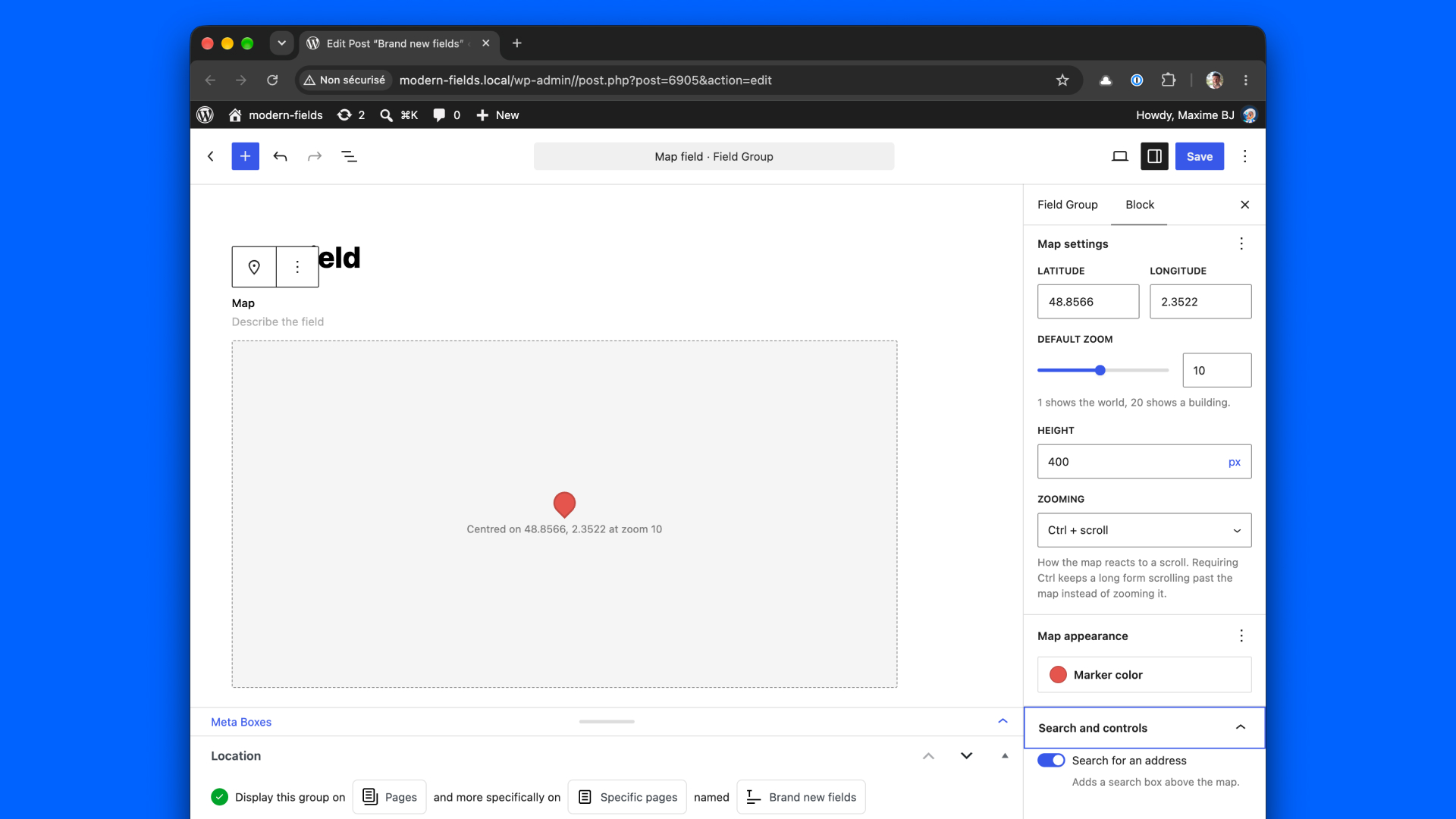
To keep the Google bill down, the field group builder never loads a map by itself: it shows a placeholder, with a Preview the map button on Google Maps.
Fill the field
In the post, the term, the user or any location of the group, place the pin in one of these ways:
- Search for an address and pick a result
- Click on the map
- Drag the pin
- Click Locate me to use your current position
- Type the latitude and longitude
The address is looked up in the language of your admin. Clear empties the field.
What the field stores
A location is saved as an array. Its keys are the same as ACF's Google Map field, so a template written for ACF keeps working untouched.
| Key | Example |
|---|---|
address | 10 Rue de Rivoli, 75004 Paris, France |
lat / lng | 48.8558 / 2.3588 |
zoom | 15 |
place_id | Google's place ID. Empty with OpenStreetMap |
name | Hôtel de Ville, only when a business was picked |
street_number, street_name, street_name_short | 10, Rue de Rivoli |
city, post_code | Paris, 75004 |
state, state_short | Île-de-France, IDF |
country, country_short | France, FR |
Every value is a string, as in ACF: cast the coordinates where you need numbers. Optional keys are only filled when the provider returns them — a rural address often has no street number — so always check before printing.
Display the location
Read the value with get_field(). A field that was never filled returns an empty array.
Link to a map
modern_fields_get_map_url() turns the value into a link to Google Maps or openstreetmap.org, following the site's provider. It builds a plain URL: no key, no script, nothing billed. It returns null when the value has no usable location.
Print a postal address
To draw a map on the front end, use the coordinates with the map library of your choice. With Google Maps, the key is yours to enqueue: the plugin only uses it in the admin, and every map shown to a visitor is a billable map load.
Use your own OpenStreetMap services
By default, maps come from the OpenStreetMap tile servers and addresses from Nominatim. Both are run by the OpenStreetMap Foundation under usage policies the field is built to respect: it is only used in the admin, the search runs when you ask for it, and requests are spaced. A site with heavy editing, or wanting another look, can point the field to its own services:
If the map fills with "Access denied" tiles, the browser sent no referrer: some security plugins set Referrer-Policy: no-referrer on the whole site, which OpenStreetMap refuses. Relax that policy, or use a tile service of your own.
Coming from ACF
The stored value is identical, so your templates need no change. Only the API key moves: ACF saves it in a setting, Modern Fields reads it from a constant or a filter. To reuse the key already saved in ACF:
A key created after March 2025 needs the Places API (New), which ACF does not use: enable it for the address search to work.
Constants and filters
Each filter runs after its constant, so it wins. They are also listed in Hooks: Actions & Filters.
| Constant | Filter | Role |
|---|---|---|
MODERN_FIELDS_MAPS_PROVIDER | modern-fields/maps/provider | The provider: google or osm |
MODERN_FIELDS_GOOGLE_MAPS_API_KEY | modern-fields/maps/api_key | The Google Maps API key |
MODERN_FIELDS_GOOGLE_MAPS_MAP_ID | modern-fields/maps/map_id | The site-wide Google Map ID |
MODERN_FIELDS_OSM_TILE_URL | modern-fields/maps/osm/tile_url | The OpenStreetMap tile URL |
MODERN_FIELDS_OSM_GEOCODER_URL | modern-fields/maps/osm/geocoder_url | The Nominatim-compatible geocoder |
| — | modern-fields/maps/osm/attribution | The credit line on OpenStreetMap maps |
| — | modern-fields/maps/providers | Register another map provider |