

Modern Fields Pro 1.4.0 introduces the ACF Migration, in beta: a guided way to move a site from Advanced Custom Fields (or SCF) to Modern Fields, field groups, values, options pages, post types and taxonomies included.
We often explain Modern Fields with three verbs.
- You create field groups by designing them visually in the block editor.
- You manage them, filling them in through the native WordPress interface.
- And you consume them without code, through block bindings and filters set inside core blocks such as the Query Loop.
Easy on a new project. Harder on a site that has run on ACF for years, with its field groups, thousands of values and templates calling get_field() everywhere. These releases are about that site.
ACF Migration: from ACF to Modern Fields in five steps
This feature is still in beta.
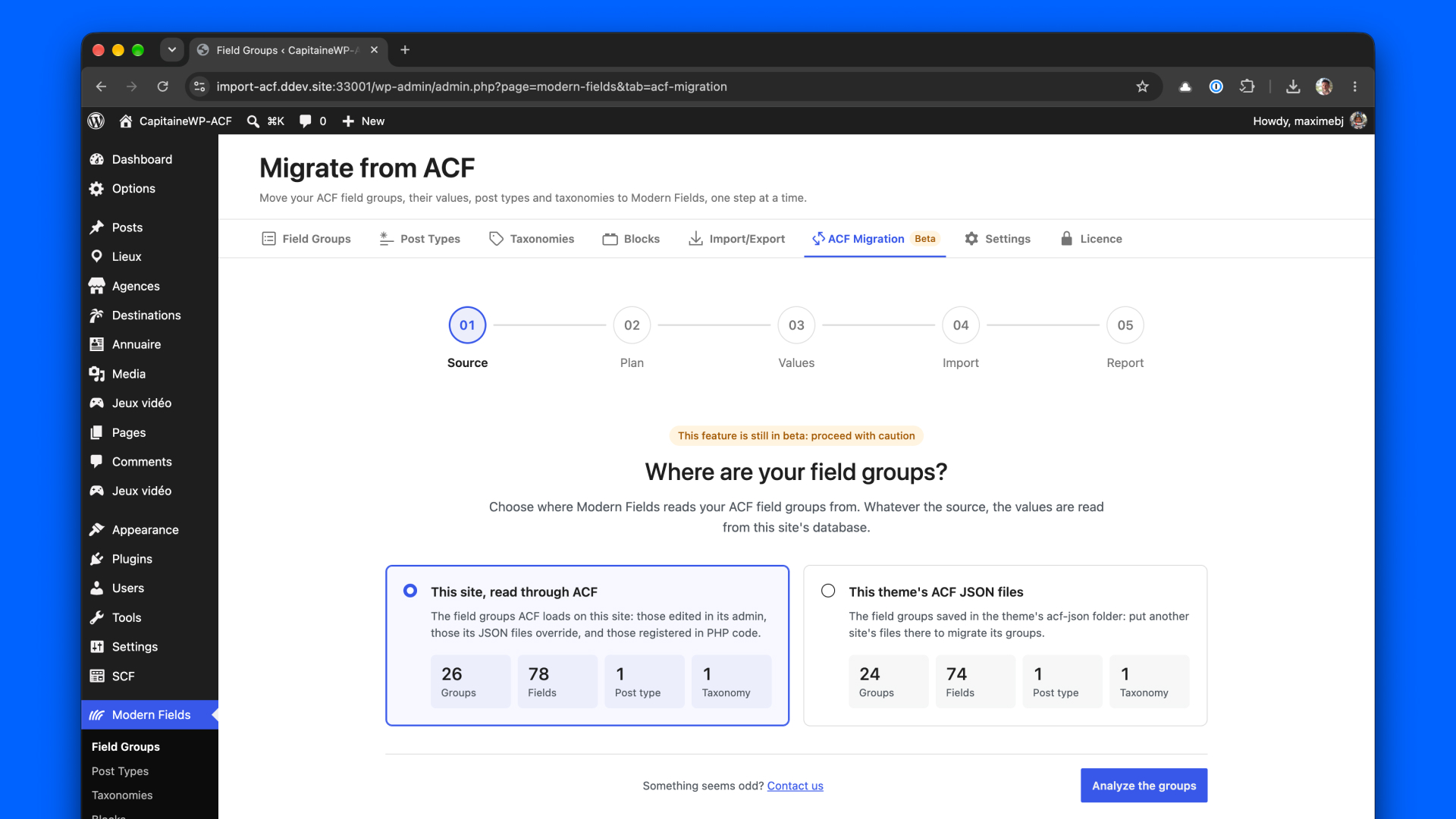
Pro 1.4.0 adds an ACF Migration screen to the Modern Fields menu, in five steps: Source, Plan, Values, Import and Report. From the terminal, wp modern-fields acf-import runs the same migration.
It works with ACF and ACF Pro 6.1 or later, and with Secure Custom Fields, which shares ACF’s code base and stores field groups and values the same way. On an older ACF, the migration asks you to update it first: its field groups and values stay as they are.
1. Source: where your field groups live
Field groups are read through ACF itself, so those your theme registers in PHP or keeps in Local JSON are found too. They can also be read straight from the theme’s acf-json files. Values always come from the site’s database.
2. Plan: nothing is written yet
Nothing is written before you approve a plan. Each ACF field group shows as Ready, Partly supported or Not supported, with what is left out and why, and you pick the groups to import.
37 ACF field types are mapped, from repeater, group, clone and gallery to relationship, link, Google Map, WYSIWYG and the Color Palette add-on, with their layout (widths, tabs, accordions, messages), conditional logic, location rules and roles.
Options pages, post types and taxonomies are taken over with their settings, under the same keys, so content and terms stay attached. A bidirectional relationship keeps one bidirectional side, and the other becomes a Reverse Relation field (new in 1.6.0), with get_field() working on both.
3. Values: keep them or convert them
Most ACF fields store their value the way Modern Fields reads it: both plugins read the same row, nothing is copied. For the others, you choose, for all fields or field by field. Keep ACF’s values writes the converted value under a prefixed name, next to ACF’s, which keeps working as before. Replace them converts the values in place.
4. Import: in batches, and resumable
Field groups are written first, then values, in batches that resume after an interruption, even a closed tab. Every value replaced goes to a rollback log first.
5. Report: switch when you are ready
The report shows what was written, reads a sample of values back, and prepares the switch:
- A theme scan lists, with file and line, what your theme and must-use plugins need ACF for: ACF functions, classes extending ACF’s, Extended ACF, ACF Builder or ACF Composer, Timber templates, field keys passed to
get_field(). - Switch to Modern Fields hands
get_field()andthe_field()over to Modern Fields, deactivates ACF and checks your home page, in one action. - A cleanup removes the rows ACF leaves behind, counted before anything is deleted.
- Until that cleanup, Going back to ACF reactivates ACF and puts back every value replaced.
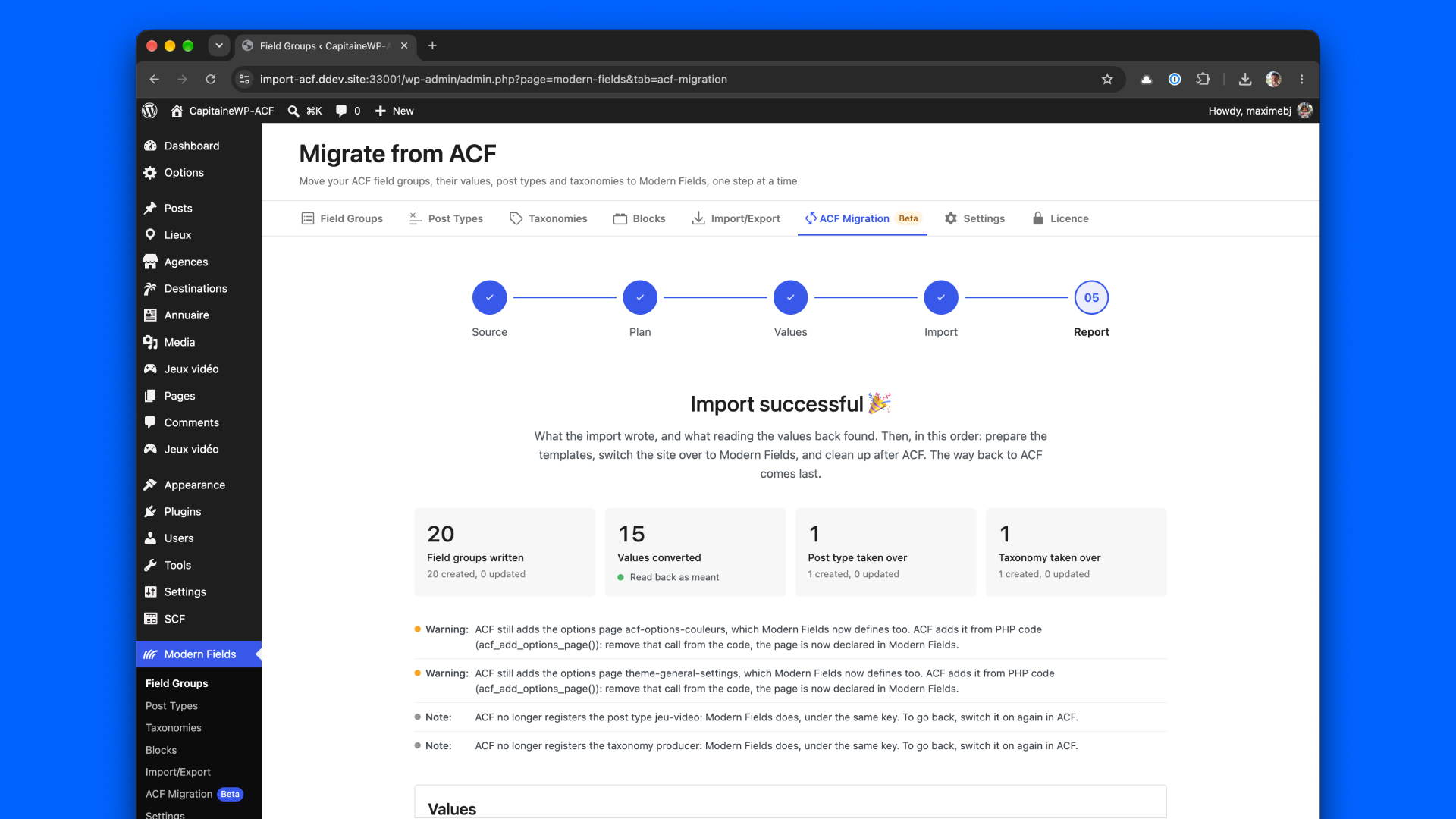
Your templates keep calling get_field() and the_field(), now answered by Modern Fields: the site keeps working while you move its display to blocks at your own pace.
What the beta does not do yet
It is a beta, so here is where it stops today:
- Flexible Content and nested repeaters are not imported. The plan lists the content holding Flexible Content values, to rebuild with blocks and patterns.
- ACF blocks are not imported yet: they come in a later version.
- Values are stored raw, not in ACF’s return format: an Image field gives its attachment ID, not an array. The report says what changes for your templates.
- Only the home page is checked after the switch: open your other templates too.
So back up your database before migrating, and try it on a staging copy first.
The highlights of Modern Fields 1.6.0
The migration lives in Pro, but much of what it relies on lands in the free plugin, for every site. Three things stand out.
Reverse Relation: one relation, edited from both sides
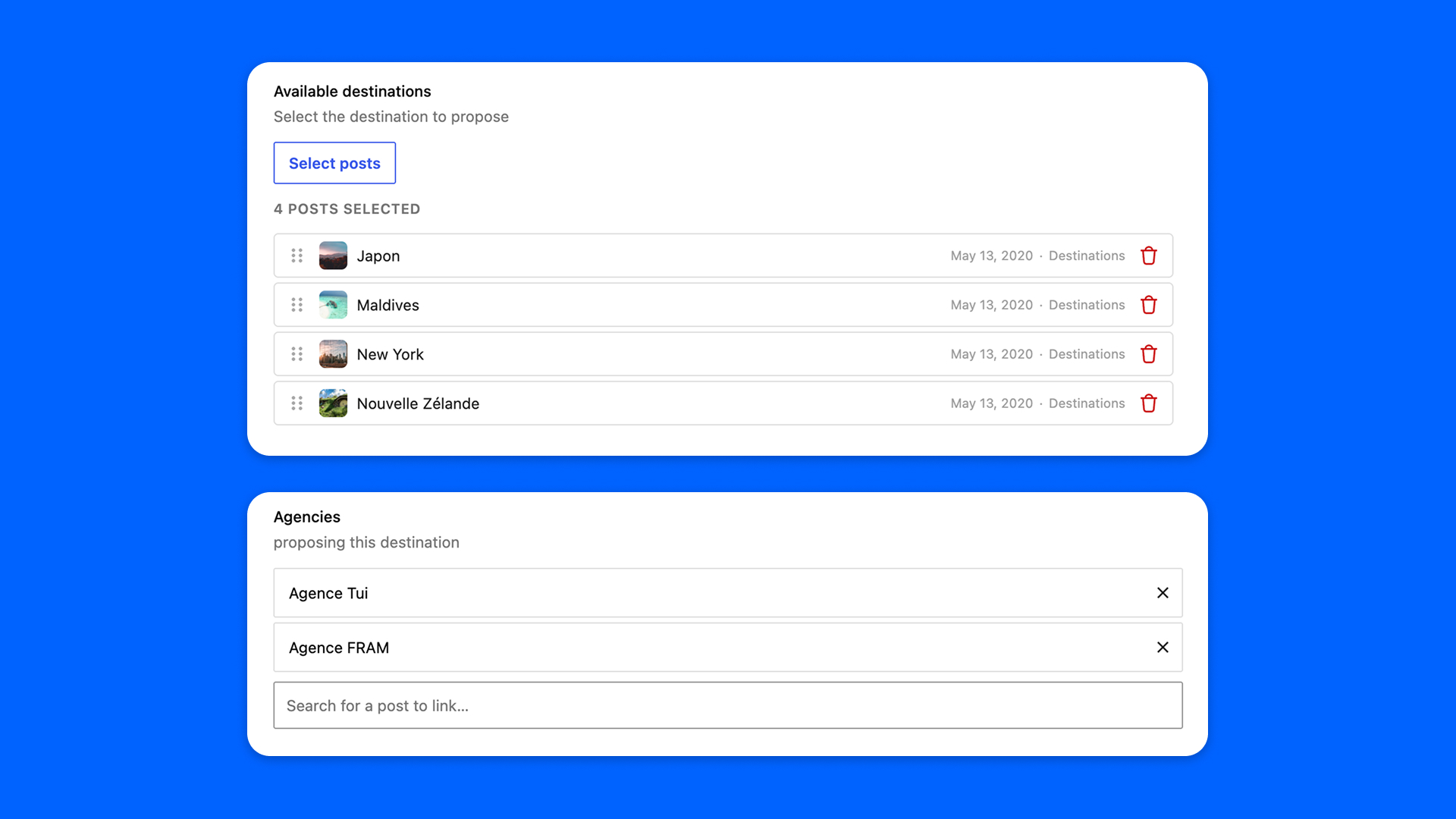
A Post Reference field (or a Relation field, with Pro) points from one post to others: an event to its speakers, a book to its author. The new Reverse Relation field sits at the other end. Placed on the speakers, it lists the events pointing at each one, and links or unlinks them from there.
There is no Bidirectional toggle to switch on any more: choosing the Reverse Relation’s source field is enough to make that field bidirectional, and get_field() on its name returns the linked posts. It is also how the ACF Migration brings over a bidirectional relationship. And if the links ever drift, wp modern-fields relations verify checks them and wp modern-fields relations rebuild repairs them.
A consolidated core
A field group now holds its own fields. The hidden copy Modern Fields kept of each field, one post per field, is deleted once after the update: one source of truth, nothing left to drift apart. Back up before you update, as the upgrade notice says: going back to an earlier version means saving each field group again.
Every screen now saves fields the same way. On the classic editor, user profiles, terms and media, the values of Checkbox, Gallery, Multi Token and Rich Text fields (and of the Repeater and Block Editor fields of Pro) were not saved: they are now, as in the block editor.
Imports follow the same idea: the Import screen shows what a file will create, update or leave unchanged before anything is written, and the JSON sync lists the files not on the site yet.
It is lighter too: options pages, dashboard widgets and get_field() with 'option' read their options in one database query, and the plugin ships with its service container already compiled. Behind it all, 3,678 unit tests, in PHP and JavaScript, run before every release.
Tighter control over your data
A field group says who may edit what, and what a value may hold. 1.6.0 makes every path respect it, not just the editor.
- Values: a value is checked against its field on every save, wherever it comes from (the editor, the REST API, code). An invalid email address is refused, the limit of a Relation field (Pro) holds, and values stored outside the fields’ screens are cleaned before they reach the forms.
- Who sees what: edit screens hand the values of a post, a term or a user only to someone who may edit it, post pickers only find the posts the user may read, and the User field no longer lists every account to anyone who edits posts.
- What a block shows: a block bound to a field only shows a field registered for what it displays, never a site setting or a post the visitor may not read, and a user profile’s value no longer runs shortcodes.
- Roles: administrators are always part of a field group’s roles, and the fields of an add-on that is switched off are closed to writes until it is back.
None of this changes how you build. It changes what the site lets through.
And also
- URL field: a web address, typed, pasted or found by searching the site’s content.
- Tabs: on WordPress 7.1, fields can be organized with the core Tabs block, repeater rows included.
- Field names accept hyphens and uppercase letters, kept as typed, as ACF users write them.
- Post types can use existing taxonomies: Categories, Tags or another plugin’s.
- Date and Time fields get a Clear button, and a Time field no longer defaults to 12:00.
- Dashboard widgets can be opened to other roles than administrators.
Also in Pro 1.4.0
- Options pages can sit under the Dashboard, Posts, Media, Pages, Comments or Users menu, or under another options page, open to the roles of their field group, and save with Cmd+S or Ctrl+S.
- Pro now ships in French, Spanish, German and Italian. Native speakers are still proofreading some of them: corrections welcome.
- Pro 1.4.0 requires Modern Fields 1.6.0.
Full details in the Modern Fields and Modern Fields Pro changelogs.
What’s next
Here is what we are designing next:
- ACF blocks: block types, the field groups placed on them and the values in your posts, turned into Modern Fields custom blocks.
- Flexible Content: a way to bring its layouts into the block editor, where blocks and patterns now do that job.
- Abilities for AI agents through MCP, so an assistant connected to your site can understand and build your field groups.
No dates yet: your feedback on the beta will set the order.
Try it, and tell us
Update Modern Fields to 1.6.0 from your dashboard or WordPress.org, then Pro to 1.4.0.
Have a site on ACF or SCF? Back up its database, make a staging copy, and run the migration there. Something looks odd? Every step has a Contact us link, and reports from real ACF sites are what will make this beta stable. Free users can also post on the support forum.
Questions or ideas? Get in touch, and happy migrating!


